What Is Amazon Recall Text Message Scam: How It Works & How to Avoid?
Have you recently received a text claiming to be from Amazon about a “product recall” or “urgent safety notice”? The message might look official, complete with the Amazon logo, order details, and realistic wording. But behind that convincing façade lies one of the most widespread phishing campaigns of 2025. The Amazon recall text message scam preys on trust and fear to steal personal data, banking details, and Amazon credentials.
This expanded guide explains everything you need to know: how these scams work, how to spot them instantly, how to verify real recalls, and how to protect your identity from future attacks. And I do it totally free so you won’t get scammed as I did (in crypto, to be honest, but my mission now is to help everyone).
Table of Contents
What Is the Amazon Recall Text Message Scam?
The Amazon recall text message scam is a type of phishing attack where cybercriminals send fake SMS alerts that claim one of your recent Amazon purchases has been recalled. These texts often include alarming statements like “Safety risk detected” or “Refund required for recalled item” and urge you to click a link to confirm your order or request a refund.
When you follow that link, you’re taken to a counterfeit Amazon login page designed to steal your credentials. Once entered, your login and personal data are sent directly to scammers who can access your real Amazon account, stored cards, and even Prime subscription.
The same impersonation technique appears in social media frauds like the IG.me scam, where attackers pose as official Instagram pages to lure victims into entering their credentials on fake login screens.
How Fake Amazon Recall Messages Look?
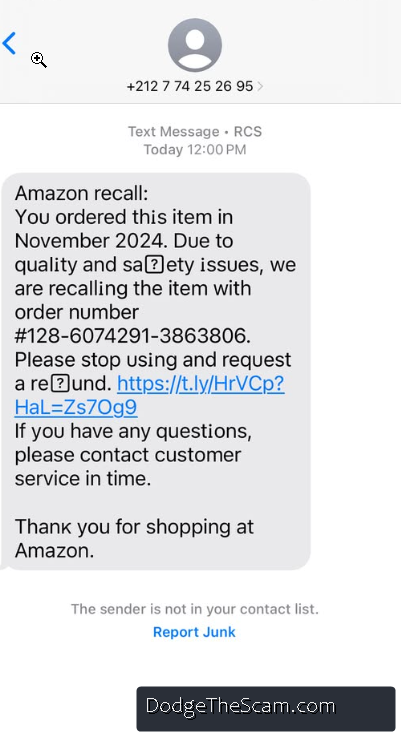
Scammers mimic Amazon’s real message format, including logos, punctuation, and realistic order numbers. Here are a few fake examples that victims have reported:
- “Amazon: Recall alert on your recent purchase. Check refund details here: [malicious link].”
- “Product recall notice. Immediate action required for item #238102 due to safety issue.”
- “Refund available: item recalled for safety reasons. Visit Amazon-confirm-refund.com now.”
The URLs are the biggest giveaway. They look similar to Amazon but have small variations such as amazon-refund-update.com or amazonrecallcheck.net. These are not legitimate.
If you want to understand the broader mechanics of such trickery, check the comprehensive phishing guide to see how scammers design their bait.
Why Are Amazon Text Scams So Effective?
The Amazon recall scam works because it uses urgency and authority to bypass rational thinking. Most people would not ignore a “recall” or “safety risk,” especially when they think it involves their home, children, or personal safety.
Scammers rely on these emotional triggers, which is the same tactic seen in other large-scale schemes like Comcast scam calls that impersonate official support lines to demand payment or information.
How Do Scammers Find Your Number?
Fraudsters collect data through multiple sources:
- Leaked customer databases
- Data brokers selling phone lists
- Malware infections that sync contacts
- Social media scraping or online form leaks
Often, victims report receiving fake recall texts just days after making legitimate Amazon purchases, suggesting that scammers target customers using timing algorithms and stolen e-commerce data. Some even use AI-based systems to predict which products you might have recently ordered.
For deeper insights on how artificial intelligence amplifies these scams, read the AI Scam Statistics 2025 report.
How the Amazon Recall Scam Works Behind the Scenes?
The process behind this scam is surprisingly advanced. Here’s how it unfolds step by step:
- Fake SMS Distribution – Scammers use automated “smishing” tools to send millions of texts per day.
- Phishing Link – Each text contains a fake Amazon link that leads to a cloned website.
- Credential Harvesting – Once you enter your login details, they’re captured in real-time.
- Account Takeover – The attacker logs into your real Amazon account to order gift cards or access your payment info.
- Monetization – The stolen data is sold or used to launder funds through fake transactions.
This cycle repeats daily, making it one of the fastest-evolving scams in the online retail space.
How to Spot a Fake Amazon Recall Text?
If you receive a suspicious recall message, you can determine its legitimacy using the steps below. These are actionable, verifiable, and safe.
1. Inspect the Sender
Real Amazon messages only come from official channels like “Amazon” or shortcodes such as 262966. Messages from personal numbers or unfamiliar addresses are fake.
2. Hover Over the Link
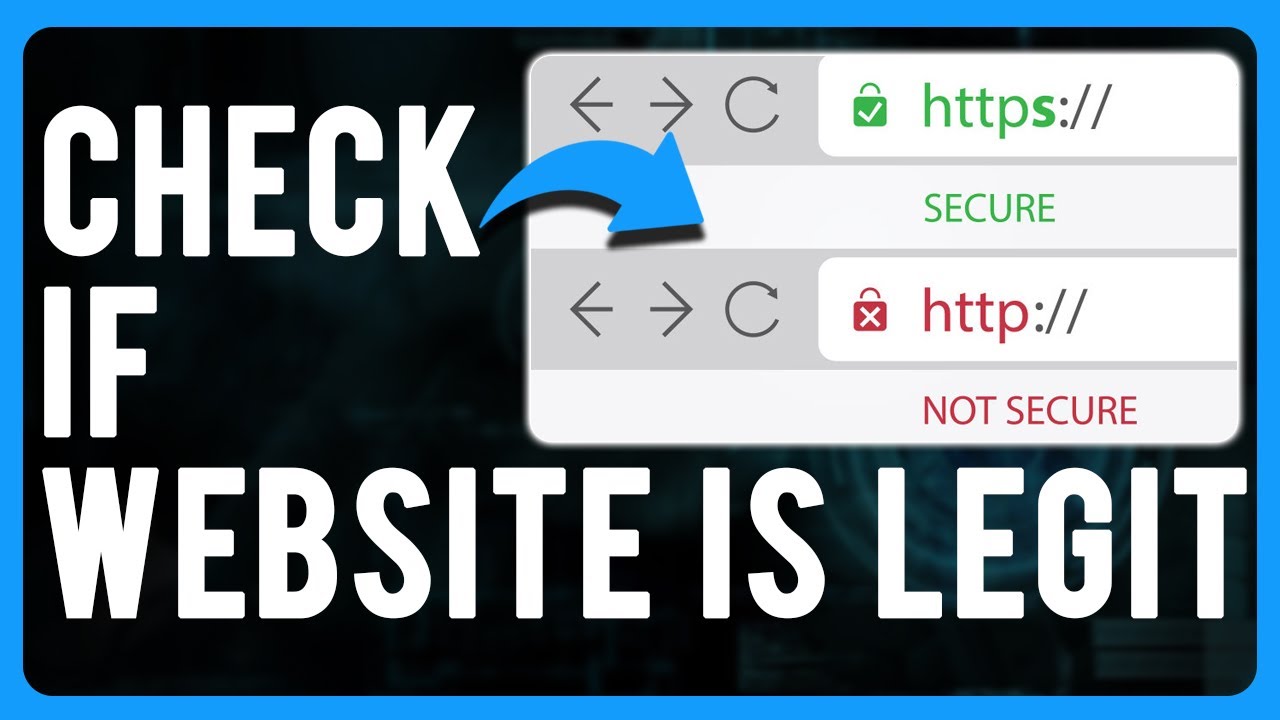
Hold down the link (without clicking). If it doesn’t start with https://www.amazon.com/ or https://www.amazon.co.uk/, do not trust it. Fake sites often have extra words or hyphens.
3. Log in Manually
Go directly to the Amazon app or type amazon.com in your browser. Check “Your Orders” → “Product Recalls.” If no recall is listed, the text is fraudulent.
4. Search for the Product Recall Page
Amazon maintains an official product recall database. Use that page to verify product information before taking any action.
5. Report the Message
Forward any suspicious texts to 7726 (SPAM) or email them to stop-spoofing@amazon.com. This helps both your carrier and Amazon block future spam campaigns.
Signs That Amazon Recall Message Is Fake
- The text contains spelling or grammar errors.
- The link doesn’t match Amazon’s official website.
- The message creates panic or urgency.
- It requests personal details or payment information.
- It promises a refund or coupon if you “act immediately.”
Each of these red flags should be taken seriously. Legitimate Amazon notifications never demand urgent responses through text.
What If You Click Amazon Recall Scam Fake Link?
If you clicked the link, don’t panic, but act fast. You might have exposed sensitive information. Here’s what to do:
- Change your Amazon password immediately.
- Enable two-factor authentication (2FA) to prevent future logins from unrecognized devices.
- Run a malware scan on your phone or computer.
- Monitor your bank statements for unauthorized charges.
- Contact Amazon Support to secure your account.
Using legitimate protection tools like Norton LifeLock can help detect identity theft early. Review the Norton LifeLock prevention guide for step-by-step protection strategies.
How AI Makes These Scams More Dangerous?
Scammers now use artificial intelligence to create highly personalized recall texts that reference your city, name, or recent purchases. Some even mimic Amazon’s tone of voice and grammar perfectly.
AI tools are also used to build realistic phishing websites in seconds, complete with fake SSL certificates and logos. This automation allows cybercriminals to launch thousands of campaigns at once, making detection harder.
A growing number of these AI-generated frauds, such as the OpenAI Atlas mobile app scam, follow similar tactics: impersonating trusted technology brands to harvest user data.
Why You Should Never Reply or Call Back?
Scammers often include a “call this number for assistance” line in their text. Calling back exposes your number to voice phishing (vishing) or automated bots that confirm your phone is active. Once verified, your number is added to a database of “responsive targets” and resold to other criminals.
How to Protect Yourself from Amazon Text Scams?
Preventing these scams requires a combination of awareness, caution, and digital hygiene.
- Avoid clicking any links in unsolicited texts.
- Do not provide personal information by SMS.
- Keep your phone’s software updated.
- Use spam filters and SMS-blocking apps.
- Educate your family about phishing and fake recall alerts.
For broader protection tips that apply across all online threats, review our online scam prevention guide.
How to Verify Real Product Recalls on Amazon?
Amazon never issues refunds or recall alerts through random texts. All legitimate recall notifications appear within your account. To verify:
- Log in through the official app or website.
- Navigate to Your Orders → Product Recalls.
- Look for any safety notices or recall details.
If the recall is not listed there, the message is fake. You can also check the official Amazon Safety and Recall Center online.
Are Amazon Recall Scams Increasing in 2025?
Yes. Reports show a sharp increase in recall-themed phishing messages, up by 120% this year alone. Cybercriminals are using AI to scale attacks and automate text distribution.
This evolution follows a larger global trend outlined in the AI Scam Statistics 2025 report, showing AI-driven scams rising across all industries.
How to Recover If You Were Scammed?
If you fell victim to a fake recall message and shared personal data:
- Immediately contact your bank to freeze your cards.
- File a report with your local cybercrime authority.
- Enable identity monitoring services to track data misuse.
- Keep documentation of texts, URLs, and timestamps for evidence.
Taking quick action can prevent further financial or identity damage.
Legitimate vs Fake Amazon Recall Texts: Quick Comparison
| Feature | Real Amazon Recall | Fake Amazon Scam |
|---|---|---|
| Sender | Official Amazon ID | Random number or Gmail |
| Link | amazon.com domain | amazon-refund-alert.net or similar |
| Message Tone | Calm and informative | Urgent, alarming, time-limited |
| Payment Requests | None | Requests refund or card details |
| Support Contact | Amazon Help Center | Fake numbers or none at all |
This simple table can help anyone instantly tell the difference between genuine and fraudulent messages.
How to Report Amazon Scam Texts to Authorities?
Reporting helps stop these scams from spreading. You can:
- Forward texts to 7726 (SPAM).
- Email Amazon at stop-spoofing@amazon.com.
- Report phishing attempts to your country’s cybercrime hotline or consumer protection agency.
The more reports filed, the faster carriers can block the sender networks.
FAQs
How can I tell if an Amazon recall message is genuine?
Log in to your Amazon account directly. If no recall appears under “Your Orders,” it’s fake.
Can clicking a fake Amazon link infect my phone?
Yes. Some links install malware or redirect to credential-stealing websites. Always close the browser and run a scan immediately.
Does Amazon ever issue refunds via text?
No. Amazon only processes refunds through your account or verified payment methods.
Are AI-generated scams common now?
Yes. Scammers increasingly use AI to personalize and automate fake texts. Learn more about this in our AI scam statistics guide.
How do I stay safe from phishing and text scams?
Follow cybersecurity best practices and review our tips for avoiding online scams to protect your digital identity.